Abstract: A complete guide to building an AI-powered QQ bot using NapCatQQ as the protocol bridge and AstrBot as the LLM orchestration framework, including persona configuration, troubleshooting, and advanced plugin development.

1. Overview

1.1 What Are We Building?

We’re building a smart QQ bot system with three core capabilities:

  • AI-Powered Chat — intelligent conversations using Large Language Models (LLMs) in both private chats and group chats, with context-aware, persona-driven replies
  • Custom Commands — slash commands and keyword triggers for specific actions (e.g., /weather, /search, /help)
  • Plugin Extensions — scheduled tasks and automated workflows without LLM token consumption (e.g., daily news broadcasts, stock alerts, game notifications)

The bot operates as a unified system where AI handles natural language while plugins handle structured tasks — maximizing functionality while minimizing API costs.

1.2 Architecture

1
2
3
4
5
6
7
8
9
10
11
┌─────────────────┐     ┌─────────────────┐     ┌──────────────────┐
│ QQ Client │ ◄─► │ NapCatQQ │ ◄─► │ AstrBot │
│ (User/Bot) │ │(Protocol Bridge)│ │(LLM Orchestrator)│
└─────────────────┘ └─────────────────┘ └────────┬─────────┘


┌─────────────────┐
│ LLM API │
│ (OpenAI/DeepSeek│
│ /Gemini/Local) │
└─────────────────┘
Component Role
NapCatQQ Protocol bridge — handles QQ client communication via OneBot V11 protocol
AstrBot LLM orchestrator — processes messages, manages context, calls LLM APIs
LLM Provider AI brain — generates intelligent responses (OpenAI, DeepSeek, Gemini, local models)
Reverse WebSocket Communication channel — connects NapCatQQ and AstrBot bidirectionally

Why this architecture? QQ’s official bot API is restrictive and limited. NapCatQQ provides a modern, community-maintained OneBot V11 implementation that unlocks full bot capabilities. AstrBot abstracts away platform differences and provides a unified LLM integration layer.


2. Prerequisites

Before starting, ensure you have:

Requirement Version Notes
Python ≥ 3.9 3.12+ recommended
Node.js ≥ 18.0 For NapCatQQ
QQ Account Any A spare account as the bot identity
LLM API Key Any OpenAI, DeepSeek, or compatible proxy

Account Safety: Use a dedicated QQ account for the bot. QQ may temporarily ban accounts exhibiting automated behavior. Do NOT use your primary account.


3. NapCatQQ Setup

3.1 What is NapCatQQ?

NapCatQQ is a modern protocol-side framework built on NTQQ (the latest QQ desktop architecture). It implements the OneBot V11 standard, providing a clean WebSocket/HTTP API for bot frameworks.

Core Features:

  • Full OneBot V11 implementation
  • Low memory footprint — runs 24/7 on minimal resources
  • Active maintenance — 459+ releases, 8k GitHub stars
  • Docker support — one-command deployment
  • WebUI management — browser-based configuration

3.2 Installation Methods

Method 1: Windows Standalone

  1. Visit NapCatQQ Releases
  2. Download the latest NapCat.Shell.Windows.OneKey.zip package
  3. Extract and run NapCatInstaller.exe
  4. Follow the installation wizard

Method 2: Shell Script (Linux)

1
2
3
4
5
6
7
# Download and run installer
curl -o napcat.sh \
https://nclatest.znin.net/NapNeko/NapCat-Installer/main/script/install.sh \
&& bash napcat.sh

# After installation, start NapCat
napcat

Method 3: Docker

1
2
3
4
5
6
docker run -d \
--name napcat \
-e ACCOUNT=<YOUR_QQ_NUMBER> \
-p 3001:3001 \
-p 6099:6099 \
mlikiowa/napcat-docker:latest

3.3 First Login (QR Code)

On first launch, NapCatQQ will display a QR code in the terminal:

1
2
# View QR code in Docker
docker logs -f napcat
  1. Open QQ mobile app on your phone
  2. Tap “+”Scan QR Code
  3. Scan the displayed QR code
  4. Confirm login on your phone

The QR code expires after 60 seconds. If expired, restart NapCatQQ to generate a new one.

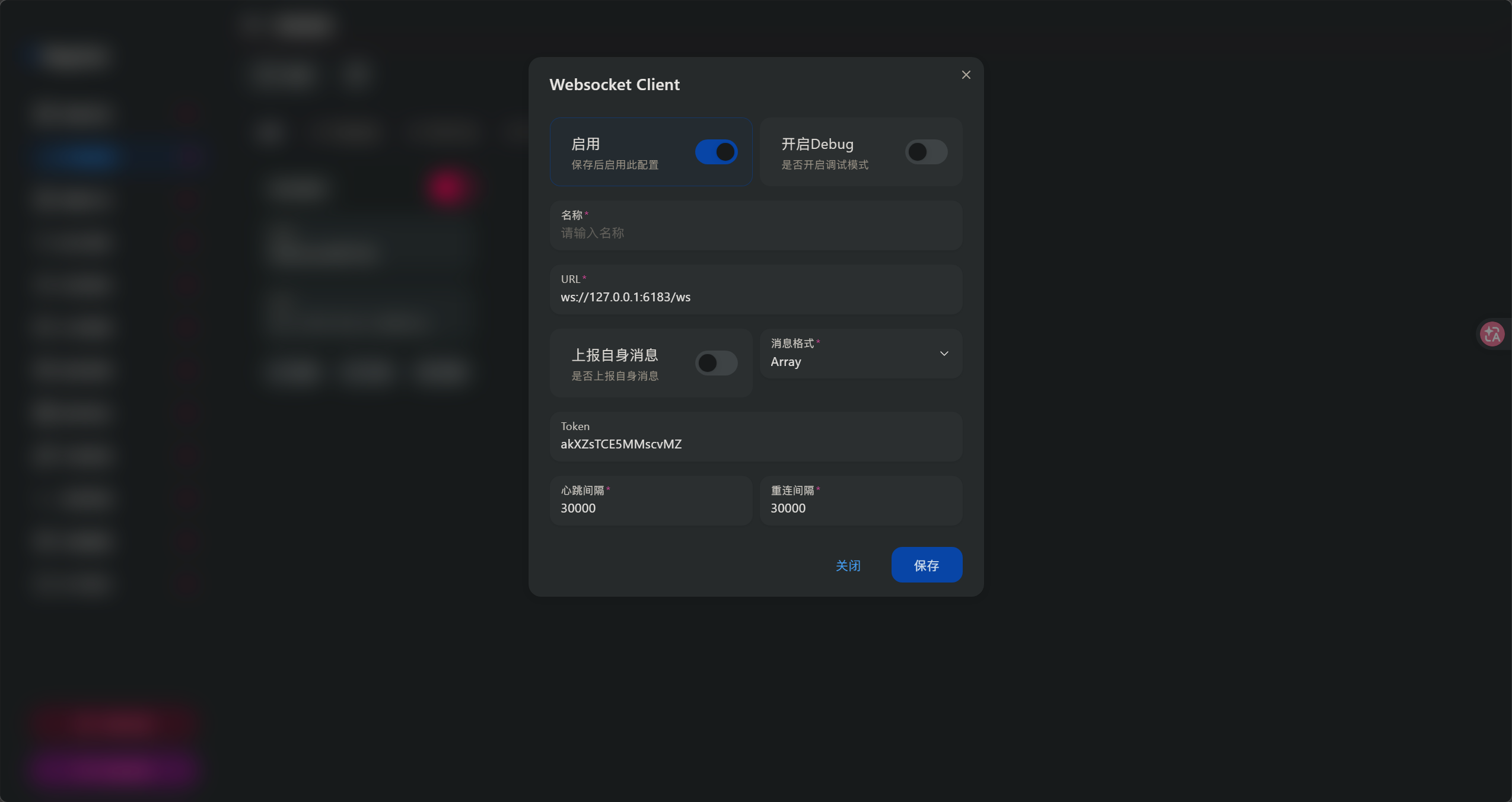
3.4 Configure Reverse WebSocket

After successful login, configure the WebSocket connection that AstrBot will use:

  1. Open NapCat WebUI at http://localhost:6099 with your token, which will display in the terminal
  2. Navigate to Network Configuration
  3. Add Reverse WebSocket Client
  4. Set the URL to: ws://127.0.0.1:6183/ws
  5. Click Save and Restart
Setting Value Description
WebSocket URL ws://127.0.0.1:6183/ws AstrBot’s listening endpoint
Access Token (optional) Add for security in production
Reconnect Interval 3000 ms Recommended for stability

4. AstrBot Setup

4.1 What is AstrBot?

AstrBot is a Python-based multi-platform chatbot framework with native LLM integration. It supports QQ, Telegram, Discord, WeChat Work, and more.

Core Features:

  • Multi-platform — single codebase, multiple messaging platforms
  • Plugin system — extensible architecture for custom functionality
  • WebUI dashboard — browser-based configuration and monitoring
  • Context management — built-in conversation history and compression
  • Persona system — customizable bot personality via system prompts

4.2 Installation

Method 1: Manual Installation ( I Use )

1
2
3
4
5
6
7
8
9
10
11
12
13
14
# Clone repository
git clone https://github.com/AstrBotDevs/AstrBot.git
cd AstrBot

# Create virtual environment
python -m venv venv
.\venv\Scripts\activate # Windows
# source venv/bin/activate # Linux/macOS

# Install dependencies
python -m pip install -r requirements.txt

# Start AstrBot
python main.py

Method 2: Using uv

1
2
3
4
5
6
7
8
# Install uv package manager
pip install uv

# Initialize AstrBot project
uv run astrbot init

# Start AstrBot
uv run astrbot run

Method 3: Docker with NapCat (All-in-One)

1
2
3
4
5
6
7
mkdir astrbot-qq && cd astrbot-qq

# Download compose file
wget https://raw.githubusercontent.com/NapNeko/NapCat-Docker/main/compose/astrbot.yml

# Start both services
docker compose -f astrbot.yml up -d

4.3 Access the Dashboard

After starting AstrBot, open the WebUI at:

1
http://localhost:6185

Default credentials are set on first launch. Check the terminal output for the admin password, or set it via environment variable ASTRBOT_ADMIN_PASSWORD.


5. Platform Connection

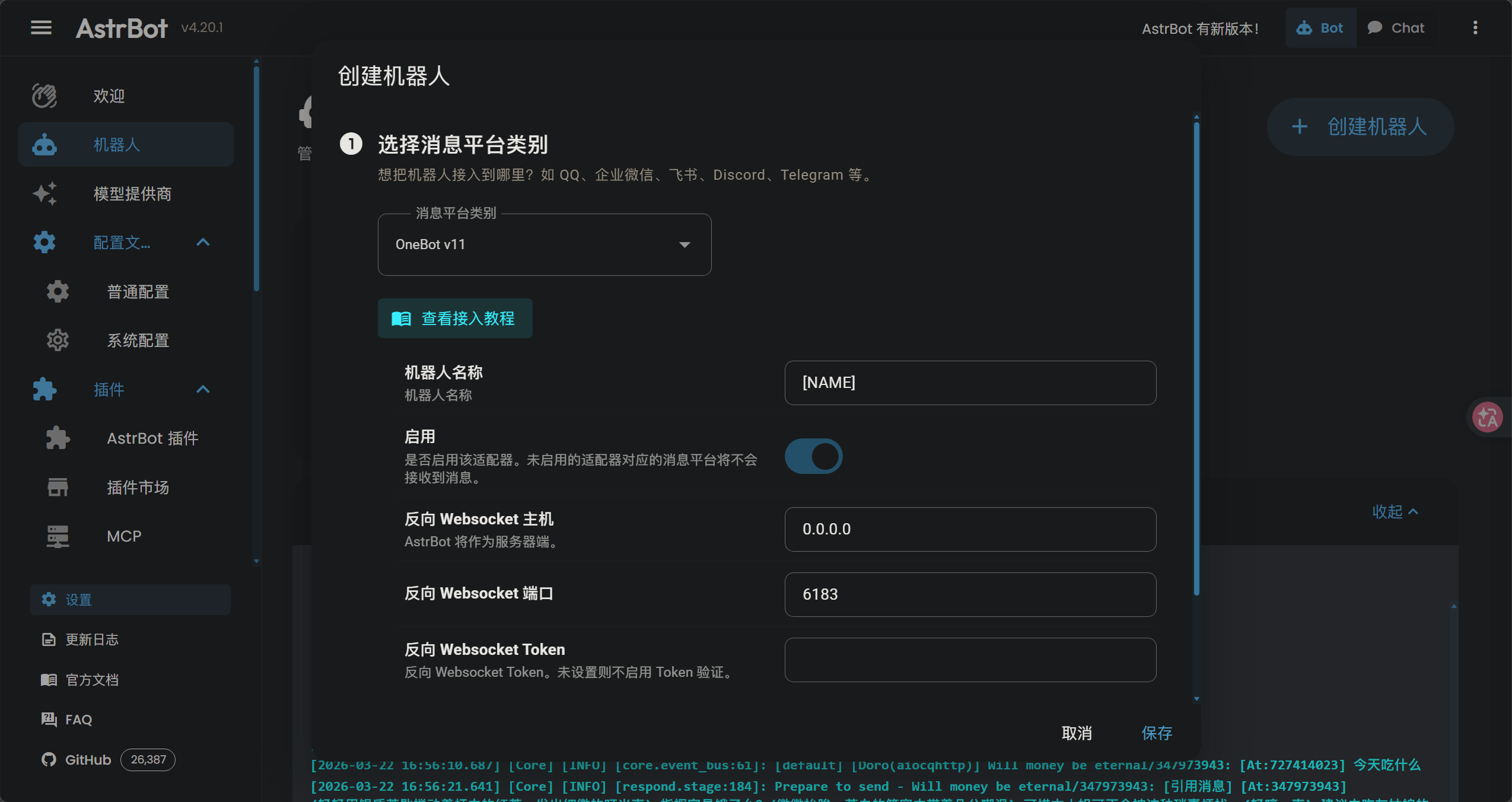
5.1 Enable QQ Platform in AstrBot

  1. Open AstrBot DashboardPlatforms page
  2. Find QQ (OneBot V11) and click Enable
  3. Configure the connection:
Setting Value Description
WebSocket Type Reverse NapCat connects TO AstrBot
Host 0.0.0.0 Listen on all interfaces
Port 6183 Default AstrBot port
  1. Click Save and Restart AstrBot

5.2 Verify Connection

Check the AstrBot console for:

1
[INFO] aiocqhttp(OneBot v11) adapter connected

This means it starts working.

And the NapCat WebUI should show “Connected” status.


6. LLM Configuration

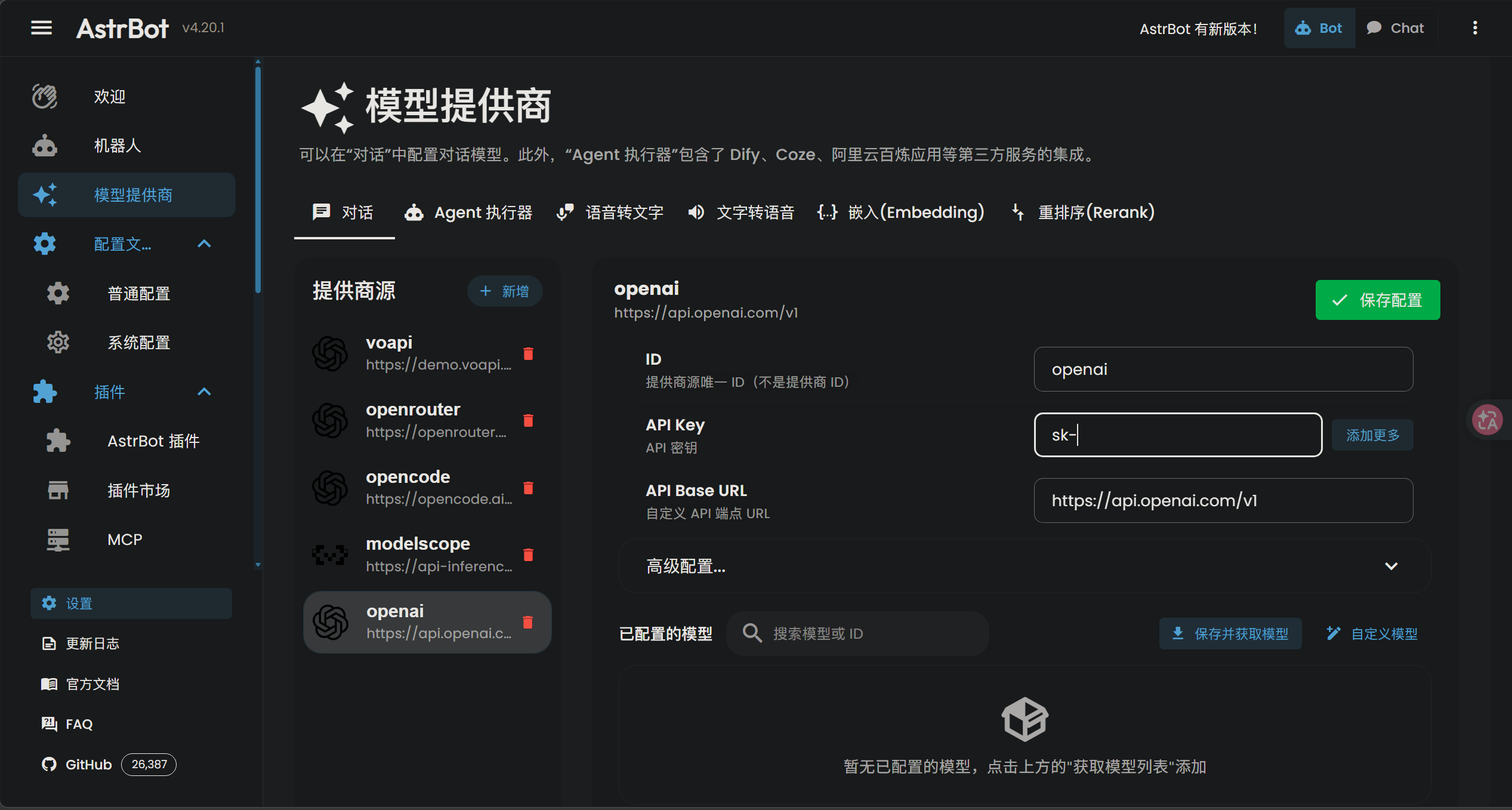
6.1 Adding an LLM Provider

  1. Open AstrBot DashboardService Providers page
  2. Click Add Provider
  3. Select OpenAI (works with any OpenAI-compatible API)
  4. Fill in the configuration:
Field Example Value Description
API Key sk-xxxxxxxxxxxx Your LLM provider’s API key
API Base URL https://api.deepseek.com/v1 Must include /v1 suffix
Model deepseek-chat Model identifier
  1. Click Save Configuration
Provider Base URL Notes
OpenAI https://api.openai.com/v1 Official, high quality, expensive
DeepSeek https://api.deepseek.com/v1 Cost-effective, strong reasoning
OpenRouter https://openrouter.ai/api/v1 Multi-provider aggregator
Local Ollama http://localhost:11434/v1 Free, private, requires GPU

6.3 Enable the Model

After adding a provider:

  1. Click Get Model List to fetch available models
  2. Find your target model (e.g., deepseek-chat)
  3. Click the “+” button to add it
  4. Toggle the switch to enable it
  5. Go to Configuration page → select the model as your conversational model
  6. Click Save Configuration at the bottom-right

7. Persona Configuration

7.1 Why Persona Matters

The persona (System Prompt) defines your bot’s personality, knowledge boundaries, and response style. A well-crafted persona:

  • Creates immersive roleplay experiences
  • Prevents inappropriate content generation
  • Maintains consistent character across conversations

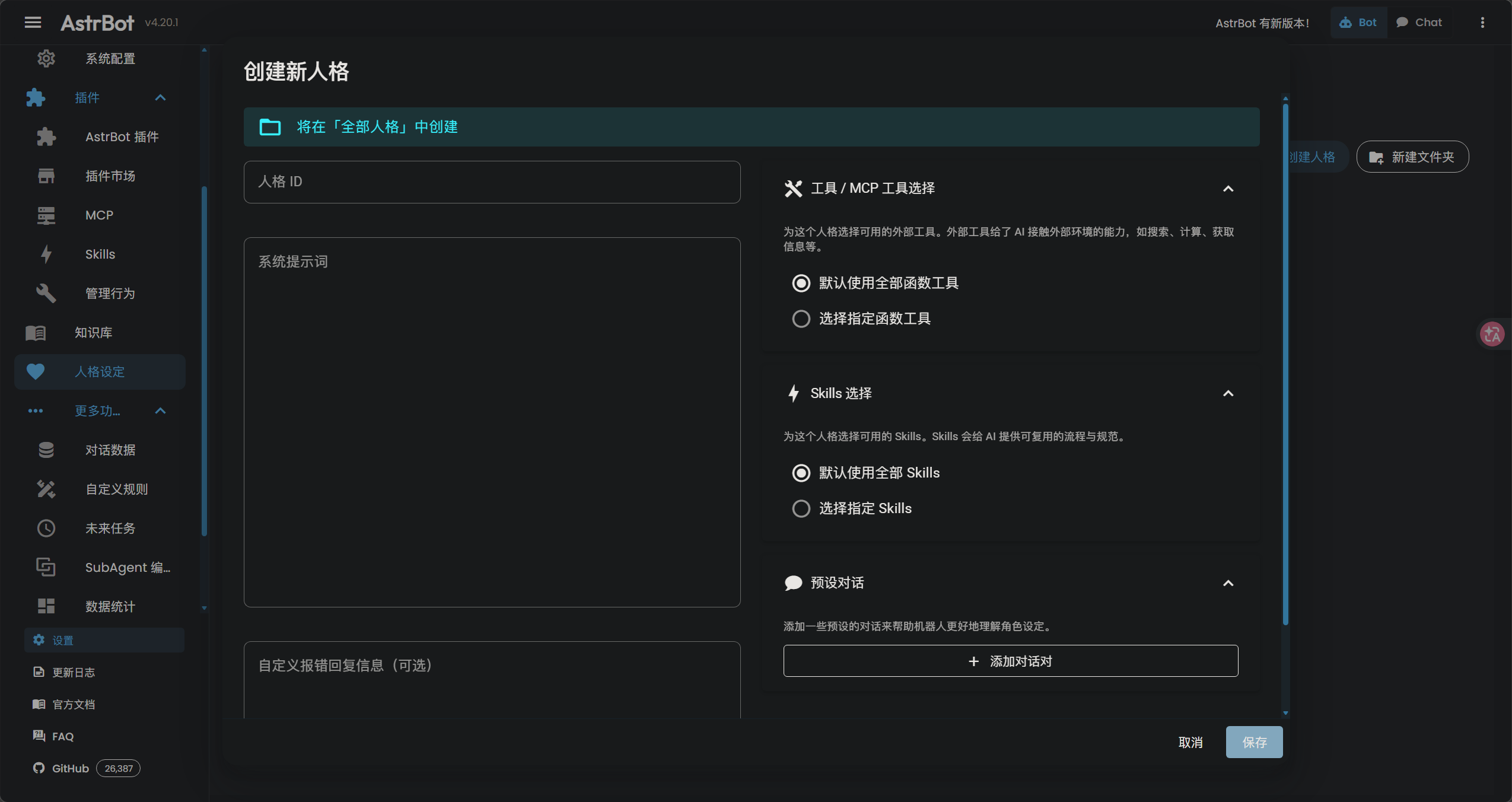
7.2 Setting Up Persona

  1. Open AstrBot DashboardPersona page
  2. Configure the System Prompt:
1
2
3
You are [Character Name], a [brief description].
Always respond in character. Use actions in parentheses () to describe body language.
Keep responses concise and engaging. Never break character or acknowledge being an AI.
  1. Set Temperature to 0.8 - 0.95 for creative responses
  2. Click Save

7.3 Persona Best Practices

✅ DO:

  • Use positive framing instead of negative prohibitions
  • Define response format (actions, tone, length)
  • Set knowledge boundaries (what the character knows)
  • Include example dialogues (Few-Shot) for consistency

❌ DON’T:

  • Use words like “violence”, “explicit”, “nsfw” — even in prohibitions
  • Write overly long system prompts (>2000 tokens)
  • Include contradictory instructions
  • Forget to test with edge-case inputs

WAF Filter Alert: Some LLM providers use Web Application Firewalls (WAF) that block requests containing sensitive keywords — even in system prompts.

Bad: “Never generate violent or sexual content”
Good: “Maintain wholesome, family-friendly conversations. Politely decline inappropriate requests with a gentle rebuke.”

7.4 Custom Error Responses

Replace generic error messages with in-character responses:

1
(sets down teacup with a gentle sigh) It seems the connection has been disrupted. How unfortunate. Please try again in a moment.

8. Troubleshooting

8.1 Common Issues

Issue 1: QR Code Login Fails with Multi-Process Error

Symptom: Repeated QR code scans fail. Console shows:

1
[error] [napcat] [utilityprocess] worker进程退出,退出码: 18446744073709515000

Cause: NapCat’s multi-process mode conflicts with the environment, causing the worker process to crash on login.

Solution: Add the environment variable to disable multi-process mode:

  1. Open the NapCat .bat startup file
  2. Add set NAPCAT_DISABLE_MULTI_PROCESS=1 right after @echo off
  3. Save and restart NapCat
1
2
3
@echo off
set NAPCAT_DISABLE_MULTI_PROCESS=1
:: ... rest of the script

Issue 2: 403 Forbidden — Text Not Allowed

Cause: LLM provider’s WAF blocking your request.

Solutions:

  1. Disable AstrBot’s built-in “Safety Mode” — its default prompt contains flagged words
  2. Audit your persona — remove any sensitive keywords
  3. Switch providers — some proxies have stricter WAF than others

Issue 3: Image Messages Cause 403 Errors

Cause: Text-only models (like DeepSeek-V3) cannot process images. AstrBot converts images to Base64, which triggers WAF as “suspicious long text”.

Solutions:

  1. Disable image understanding in AstrBot settings
  2. Route images separately — use a vision-capable model (GPT-4o-mini, Gemini Flash) only for image analysis

Issue 4: 30+ Second Delay After Config Changes

Cause: AstrBot hot-reloads configuration, which resets the WebSocket connection. NapCat’s reconnect delay causes the gap.

Solutions:

  1. Wait for reconnection — watch console for adapter connected message
  2. Reduce reconnect interval in NapCat to 3000ms
  3. Restart both services if connection doesn’t recover

Issue 5: Bot Not Responding in Groups

Cause:

  • Bot needs to be @mentioned in groups.
  • Your bot’s QQ account was expired.

Solutions:

  1. Check group settings in AstrBot Dashboard or set trigger conditions
  2. Restart NapcatQQ to login again

8.2 Diagnostic Checklist

Check the terminal output to get the error info

Check Command/Action
AstrBot running? python main.py or check process
NapCat connected? Check WebUI status
LLM API working? Test via AstrBot WebUI chat
Logs clean? Check AstrBot and NapCat console output

9. Advanced: Custom Plugins

9.1 Why Write Plugins?

Plugins extend AstrBot with custom functionality without LLM token consumption. Use cases:

  • Scheduled broadcasts (news, weather, reminders)
  • API integrations (stock prices, game stats)
  • Moderation tools (auto-delete, warnings)
  • Utility commands (calculators, converters)

9.2 Plugin Structure

Create a plugin folder at AstrBot/data/plugins/your_plugin_name/:

1
2
3
your_plugin_name/
├── manifest.json # Plugin metadata
└── main.py # Plugin logic

manifest.json:

1
2
3
4
5
6
{
"name": "your_plugin_name",
"version": "1.0.0",
"author": "YourName",
"description": "Brief description of what this plugin does"
}

9.3 Example: Daily News Broadcast Plugin

A practical plugin that fetches daily news, free Epic games and daily bing wallpaper, and broadcasts to a QQ group at certain time — zero LLM token consumption.

Using 60s API, and by Gemini 3.1 Pro and Mimo V2 Pro

Click here to expand full plugin code (main.py)
1
2
3
4
5
6
7
8
9
10
11
12
13
14
15
16
17
18
19
20
21
22
23
24
25
26
27
28
29
30
31
32
33
34
35
36
37
38
39
40
41
42
43
44
45
46
47
48
49
50
51
52
53
54
55
56
57
58
59
60
61
62
63
64
65
66
67
68
69
70
71
72
73
74
75
76
77
78
79
80
81
82
83
84
85
86
87
88
89
90
91
92
93
94
95
96
97
98
99
100
101
102
103
104
105
106
107
108
109
110
111
112
113
114
115
116
117
118
119
120
121
122
123
124
125
126
127
128
129
130
131
132
133
134
135
136
137
138
139
140
141
142
143
144
145
146
147
148
149
150
151
152
153
154
155
156
157
158
159
160
161
162
163
164
165
166
167
168
169
170
171
172
173
174
175
176
177
178
179
180
181
182
183
184
185
186
187
188
189
190
191
192
193
194
195
196
197
198
199
200
201
202
203
204
205
206
207
208
209
210
211
212
213
214
215
216
217
218
219
220
221
222
223
224
225
226
227
228
229
230
231
232
233
234
235
236
237
238
239
240
241
242
243
244
245
246
247
248
249
250
251
252
253
254
255
256
257
258
259
260
261
262
263
264
265
266
267
268
269
270
271
272
273
274
275
276
277
278
279
280
281
282
283
284
285
286
287
288
289
290
291
292
293
294
295
296
297
298
299
300
301
302
303
304
305
306
307
308
309
310
311
312
313
314
315
316
317
318
319
320
321
322
323
324
325
326
327
328
329
330
331
332
333
334
335
336
337
338
339
340
341
342
343
344
345
346
347
348
349
350
351
352
353
354
355
356
357
import aiohttp
import datetime # 不要删除 推送测试会使用
from apscheduler.schedulers.asyncio import AsyncIOScheduler

from astrbot.api.all import Context, Star, logger, register
from astrbot.core.message.components import Image, Plain

# ================= 配置区(按需修改) =================
GROUP_ID = [QQ_NUMBER] # 目标 QQ 群号
# =====================================================


@register(
"doro_broadcast",
"FrozenYears",
"1.3.0",
"Doro 定时新闻、每日壁纸与 Epic 推送",
)
class DoroBroadcast(Star):
"""
定时抓取新闻、 Epic 免费游戏和必应每日壁纸,并以 Doro 人设推送到指定 QQ 群。
使用 APScheduler 进行定时任务调度:
- 每天 11:00 推送每日新闻
- 每天 15:00 推送每日壁纸
- 每周五 11:10 推送 Epic 免费游戏
- 启动后延迟 45 秒执行一次推送测试(规避 NapCat 冷启动窗口期)
"""

def __init__(self, context: Context) -> None:
super().__init__(context)
self.scheduler = AsyncIOScheduler(timezone="Asia/Shanghai")

async def initialize(self) -> None:
"""插件激活时注册所有定时任务并启动调度器。"""
# 每天 11:00 推送新闻
self.scheduler.add_job(
self.send_daily_news,
"cron",
hour=11,
minute=0,
id="doro_daily_news",
replace_existing=True,
misfire_grace_time=60,
)
# 每周五 11:10 推送 Epic 免费游戏
self.scheduler.add_job(
self.send_epic_games,
"cron",
day_of_week="fri",
hour=11,
minute=10,
id="doro_epic_games",
replace_existing=True,
misfire_grace_time=60,
)
# 每天 15:00 推送 Bing 每日图片
self.scheduler.add_job(
self.send_bing_daily,
"cron",
hour=15,
minute=0,
id="doro_bing_daily",
replace_existing=True,
misfire_grace_time=60,
)
# 【测试推送】冷启动规避:延迟 45 秒执行一次测试推送
# test_time = datetime.datetime.now() + datetime.timedelta(seconds=45)
# self.scheduler.add_job(
# self.send_bing_daily, # 新闻测试
# "date",
# run_date=test_time,
# id="doro_test_daily_news",
# replace_existing=True,
# )

self.scheduler.start()
logger.info("[DoroBroadcast] 插件已挂载!")

async def terminate(self) -> None:
"""插件卸载时优雅关闭调度器。"""
if self.scheduler.running:
self.scheduler.shutdown(wait=False)
logger.info("[DoroBroadcast] 调度器已关闭。")

# ------------------------------------------------------------------
# 核心:防雷暴内存反射发包
# ------------------------------------------------------------------

async def _send_to_group(self, msg) -> None:
"""
使用 AstrBot 官方 API 主动推送到指定群组
"""
try:
import asyncio

from astrbot.core.message.components import Plain
from astrbot.core.message.message_event_result import MessageChain
from astrbot.core.platform.astr_message_event import MessageSession

logger.info("[DoroBroadcast] 准备通过官方接口发送群消息...")

# 动态获取 aiocqhttp 适配器的真实 ID
platform_id = "aiocqhttp"
if hasattr(self.context, "platform_manager") and hasattr(
self.context.platform_manager, "platform_insts"
):
for platform in self.context.platform_manager.platform_insts:
meta = platform.meta()
if meta.name == "aiocqhttp":
platform_id = meta.id
break

# 使用框架标准的 MessageSession (注意单词拼写是框架原本的设计)
# 格式: platform_name:message_type:session_id
# 注意:此处的 platform_name 在 v4 中实际上要求传入 platform.meta().id
session = MessageSession.from_str(f"{platform_id}:GroupMessage:{GROUP_ID}")

if isinstance(msg, str):
chain = MessageChain([Plain(msg)])
elif isinstance(msg, list):
chain = MessageChain(msg)
elif isinstance(msg, MessageChain):
chain = msg
else:
logger.error("[DoroBroadcast] 不支持的消息格式")
return

# 重试机制 (最大 3 次)
max_retries = 3
for attempt in range(max_retries):
try:
# 使用官方 API 发送消息
success = await self.context.send_message(session, chain)

if success:
logger.info(
f"[DoroBroadcast] ✅ 成功推送消息到群 {GROUP_ID} (适配器: {platform_id})"
)
return # 发送成功,退出函数
else:
logger.warning(
f"[DoroBroadcast] ⚠️ 推送失败 (尝试 {attempt + 1}/{max_retries}): 找不到匹配的平台 ({platform_id}) 或发送不成功"
)
if attempt < max_retries - 1:
await asyncio.sleep(1)
continue

except Exception as e:
# 检查是否为超时错误 (retcode=1200)
# 通过检查异常对象的属性来判断
error_str = str(e)

# 检查常见的超时模式
is_timeout = (
"retcode=1200" in error_str
or "Timeout" in error_str
or "serviceAndMethod:NodeIKernelMsgService/sendMsg" in error_str
)

if is_timeout:
logger.warning(
f"[DoroBroadcast] ⚠️ 推送超时 (尝试 {attempt + 1}/{max_retries}): {e}"
)
if attempt < max_retries - 1:
await asyncio.sleep(2) # 超时等待久一点
continue
else:
# 重试次数耗尽,重新抛出异常
raise e
else:
# 不是超时异常,直接抛出
raise e

except Exception as e:
logger.error(f"[DoroBroadcast] ❌ 推送消息时发生异常: {e}")

# ------------------------------------------------------------------
# 新闻推送
# ------------------------------------------------------------------

async def send_daily_news(self) -> None:
"""拉取 60s API 新闻并以 Doro 人设推送到群。"""
logger.info("[DoroBroadcast] 开始执行每日新闻抓取...")
try:
timeout = aiohttp.ClientTimeout(total=15)
async with aiohttp.ClientSession(timeout=timeout) as session:
async with session.get(
"https://60s.viki.moe/v2/60s?encoding=image"
) as resp:
if resp.status != 200:
logger.error(
f"[DoroBroadcast] 新闻 API 返回异常状态码: {resp.status}"
)
return
image_bytes = await resp.read()

from astrbot.core.message.components import Image, Plain

start_msg = (
"(摇着短小的小尾巴哒哒哒跑过来) 唔!人!"
"Doro 叼来了今天的报纸!嘿嘿~\n\n"
)

end_msg = (
"\n(放下报纸,吐着舌头狂摇尾巴) 读完了(ノ≧∀≦)ノ\n"
"Doro 这么能干,人是不是该奖励 Doro 一大个欧润吉呀?( ´﹃`)"
)

components = [
Plain(start_msg),
Image.fromBytes(image_bytes),
Plain(end_msg),
]

logger.info("[DoroBroadcast] 新闻拉取成功,准备推送。")
await self._send_to_group(components)

except Exception as e:
logger.error(f"[DoroBroadcast] 新闻抓取崩溃: {e}")

# ------------------------------------------------------------------
# Epic 免费游戏推送
# ------------------------------------------------------------------

async def send_epic_games(self) -> None:
"""拉取 Epic 免费游戏列表并以 Doro 人设推送到群。"""
logger.info("[DoroBroadcast] 开始执行 Epic 免费游戏抓取...")
try:
timeout = aiohttp.ClientTimeout(total=15)
async with aiohttp.ClientSession(timeout=timeout) as session:
async with session.get("https://60s.viki.moe/v2/epic") as resp:
data = await resp.json(content_type=None)

if data.get("code") != 200:
logger.error(f"[DoroBroadcast] Epic API 返回异常: {data}")
return

game_list: list[dict] = data.get("data", [])

# 构建完整消息组件列表
components = []

# 添加开场消息
start_msg = (
"(摇着短小的小尾巴哒哒哒跑过来) 唔!人!"
"Doro 叼来了 Epic 本周的免费游戏清单!嘿嘿~\n\n"
)
components.append(Plain(start_msg))

# 为每个游戏添加封面图片和文本信息
for item in game_list:
title: str = item.get("title", "")
description: str = item.get("description", "Doro不知道哦")
price: str = item.get("original_price_desc", "Doro不知道哦")
free_end: str = item.get("free_end", "Doro不知道哦")
link: str = item.get("link", "Doro不知道哦")
cover_url: str = item.get("cover", "")

if not title:
continue

# 直接使用封面图片URL(无需下载)
if cover_url:
components.append(Image.fromURL(cover_url))
logger.info(f"[DoroBroadcast] 添加封面URL: {title}")

# 添加文本信息
info_text = (
f"🎮 {title}\n"
f"✍️ 简介:{description}\n"
f"💰 原价:{price}\n"
f"⏰ 截止:{free_end}\n"
f"🔗 链接:{link}\n\n"
)
components.append(Plain(info_text))

# 添加结束消息
end_msg = (
"🐾 Doro的小纸条:记得登录领取哦!\n"
"(放下游戏清单,吐着舌头狂摇尾巴) 读完了(ノ≧∀≦)ノ\n"
"Doro 这么能干,人是不是该奖励 Doro 一大个欧润吉呀?( ´﹃`)"
)
components.append(Plain(end_msg))

# 发送完整消息
await self._send_to_group(components)

logger.info("[DoroBroadcast] Epic 数据拉取成功,准备推送。")

except Exception as e:
logger.error(f"[DoroBroadcast] Epic 抓取崩溃: {e}")

# ------------------------------------------------------------------
# Bing 每日图片推送
# ------------------------------------------------------------------

async def send_bing_daily(self) -> None:
"""拉取 Bing 每日图片数据并以 Doro 人设推送到群。"""
logger.info("[DoroBroadcast] 开始执行 Bing 每日图片抓取...")
try:
timeout = aiohttp.ClientTimeout(total=15)
async with aiohttp.ClientSession(timeout=timeout) as session:
async with session.get("https://60s.viki.moe/v2/bing") as resp:
data = await resp.json(content_type=None)

if data.get("code") != 200:
logger.error(f"[DoroBroadcast] Bing API 返回异常: {data}")
return

bing_data: dict = data.get("data", {})

# 提取所需字段
title: str = bing_data.get("title", "未知标题")
headline: str = bing_data.get("headline", "未知标题")
description: str = bing_data.get("description", "暂无描述")
main_text: str = bing_data.get("main_text", "暂无详细信息")
cover_4k_url: str = bing_data.get("cover_4k", "")

# 构建完整消息组件列表
components = []

# 添加开场消息(用户指定的固定开头)
start_msg = (
"(端着精致的白瓷茶杯,目光微微低垂,注视着刚刚为您送达的画卷,"
"嘴角勾起一抹完美无瑕的轻柔微笑)\n"
"呵呵……指挥官,您看。这是今日从远方传来的风景。\n\n"
)
components.append(Plain(start_msg))

# 添加图片(如果存在)
if cover_4k_url:
components.append(Image.fromURL(cover_4k_url))
logger.info(f"[DoroBroadcast] 添加 Bing 4K 图片: {cover_4k_url}")

# 添加文本信息
info_text = (
f"🎨 标题:{title}\n"
f"📰 头条:{headline}\n"
f"📝 描述:{description}\n"
f"📖 详情:{main_text}"
)
components.append(Plain(info_text))

# 添加结束消息(用户指定的固定结尾)
end_msg = (
"\n\n(缓缓抬起头,静静地注视着您,笑容愈发温柔,却让人感到一丝战栗)\n"
"我将这份虚幻的美丽带给了您。希望这片刻的宁静,能稍微洗刷掉您沾染的尘埃。请尽情欣赏吧……"
)
components.append(Plain(end_msg))

# 发送完整消息
await self._send_to_group(components)

logger.info("[DoroBroadcast] Bing 每日图片数据拉取成功,准备推送。")

except Exception as e:
logger.error(f"[DoroBroadcast] Bing 每日图片抓取崩溃: {e}")

Required Dependencies:

1
2
3
4
5
# Activate virtual environment first
.\.venv\Scripts\activate

# Install required packages
uv pip install aiohttp apscheduler

After installing dependencies, restart AstrBot (python main.py).


10. Summary

Component Purpose Key Setting
NapCatQQ QQ protocol bridge Reverse WebSocket → ws://127.0.0.1:6183/ws
AstrBot LLM orchestrator Platform: QQ (OneBot V11)
LLM Provider AI brain API Key + Base URL + Model
Persona Bot personality System prompt with positive framing

Architecture Flow:

1
2
3
4
5
6
7
User sends QQ message
→ NapCatQQ receives via OneBot V11
→ AstrBot processes message
→ LLM generates response
→ AstrBot formats reply
→ NapCatQQ sends to QQ
→ User receives reply

References