QQ Bot Construction Tutorial with NapCatQQ and AstrBot
1. Overview
1.1 What Are We Building?
We’re building a smart QQ bot system with three core capabilities:
- AI-Powered Chat — intelligent conversations using Large Language Models (LLMs) in both private chats and group chats, with context-aware, persona-driven replies
- Custom Commands — slash commands and keyword triggers for specific actions (e.g.,
/weather,/search,/help) - Plugin Extensions — scheduled tasks and automated workflows without LLM token consumption (e.g., daily news broadcasts, stock alerts, game notifications)
The bot operates as a unified system where AI handles natural language while plugins handle structured tasks — maximizing functionality while minimizing API costs.
1.2 Architecture
1 | ┌─────────────────┐ ┌─────────────────┐ ┌──────────────────┐ |
| Component | Role |
|---|---|
| NapCatQQ | Protocol bridge — handles QQ client communication via OneBot V11 protocol |
| AstrBot | LLM orchestrator — processes messages, manages context, calls LLM APIs |
| LLM Provider | AI brain — generates intelligent responses (OpenAI, DeepSeek, Gemini, local models) |
| Reverse WebSocket | Communication channel — connects NapCatQQ and AstrBot bidirectionally |
Why this architecture? QQ’s official bot API is restrictive and limited. NapCatQQ provides a modern, community-maintained OneBot V11 implementation that unlocks full bot capabilities. AstrBot abstracts away platform differences and provides a unified LLM integration layer.
2. Prerequisites
Before starting, ensure you have:
| Requirement | Version | Notes |
|---|---|---|
| Python | ≥ 3.9 | 3.12+ recommended |
| Node.js | ≥ 18.0 | For NapCatQQ |
| QQ Account | Any | A spare account as the bot identity |
| LLM API Key | Any | OpenAI, DeepSeek, or compatible proxy |
Account Safety: Use a dedicated QQ account for the bot. QQ may temporarily ban accounts exhibiting automated behavior. Do NOT use your primary account.
3. NapCatQQ Setup
3.1 What is NapCatQQ?
NapCatQQ is a modern protocol-side framework built on NTQQ (the latest QQ desktop architecture). It implements the OneBot V11 standard, providing a clean WebSocket/HTTP API for bot frameworks.
Core Features:
- Full OneBot V11 implementation
- Low memory footprint — runs 24/7 on minimal resources
- Active maintenance — 459+ releases, 8k GitHub stars
- Docker support — one-command deployment
- WebUI management — browser-based configuration
3.2 Installation Methods
Method 1: Windows Standalone
- Visit NapCatQQ Releases
- Download the latest
NapCat.Shell.Windows.OneKey.zippackage - Extract and run
NapCatInstaller.exe - Follow the installation wizard
Method 2: Shell Script (Linux)
1 | # Download and run installer |
Method 3: Docker
1 | docker run -d \ |
3.3 First Login (QR Code)
On first launch, NapCatQQ will display a QR code in the terminal:
1 | # View QR code in Docker |
- Open QQ mobile app on your phone
- Tap “+” → Scan QR Code
- Scan the displayed QR code
- Confirm login on your phone
The QR code expires after 60 seconds. If expired, restart NapCatQQ to generate a new one.
3.4 Configure Reverse WebSocket
After successful login, configure the WebSocket connection that AstrBot will use:
- Open NapCat WebUI at
http://localhost:6099with your token, which will display in the terminal - Navigate to Network Configuration
- Add Reverse WebSocket Client
- Set the URL to:
ws://127.0.0.1:6183/ws - Click Save and Restart
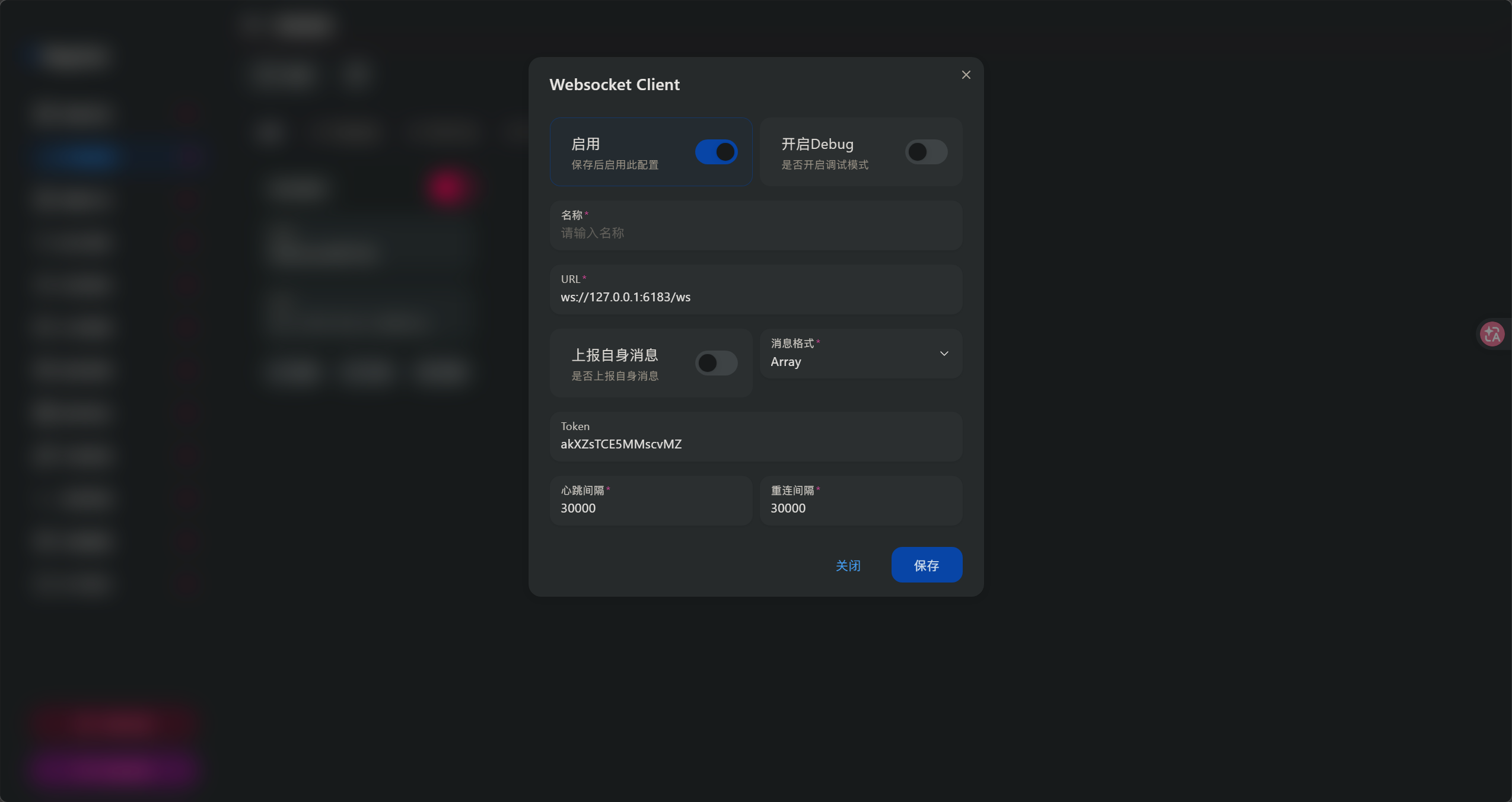
| Setting | Value | Description |
|---|---|---|
| WebSocket URL | ws://127.0.0.1:6183/ws |
AstrBot’s listening endpoint |
| Access Token | (optional) | Add for security in production |
| Reconnect Interval | 3000 ms |
Recommended for stability |
4. AstrBot Setup
4.1 What is AstrBot?
AstrBot is a Python-based multi-platform chatbot framework with native LLM integration. It supports QQ, Telegram, Discord, WeChat Work, and more.
Core Features:
- Multi-platform — single codebase, multiple messaging platforms
- Plugin system — extensible architecture for custom functionality
- WebUI dashboard — browser-based configuration and monitoring
- Context management — built-in conversation history and compression
- Persona system — customizable bot personality via system prompts
4.2 Installation
Method 1: Manual Installation ( I Use )
1 | # Clone repository |
Method 2: Using uv
1 | # Install uv package manager |
Method 3: Docker with NapCat (All-in-One)
1 | mkdir astrbot-qq && cd astrbot-qq |
4.3 Access the Dashboard
After starting AstrBot, open the WebUI at:
1 | http://localhost:6185 |
Default credentials are set on first launch. Check the terminal output for the admin password, or set it via environment variable ASTRBOT_ADMIN_PASSWORD.
5. Platform Connection
5.1 Enable QQ Platform in AstrBot
- Open AstrBot Dashboard → Platforms page
- Find QQ (OneBot V11) and click Enable
- Configure the connection:
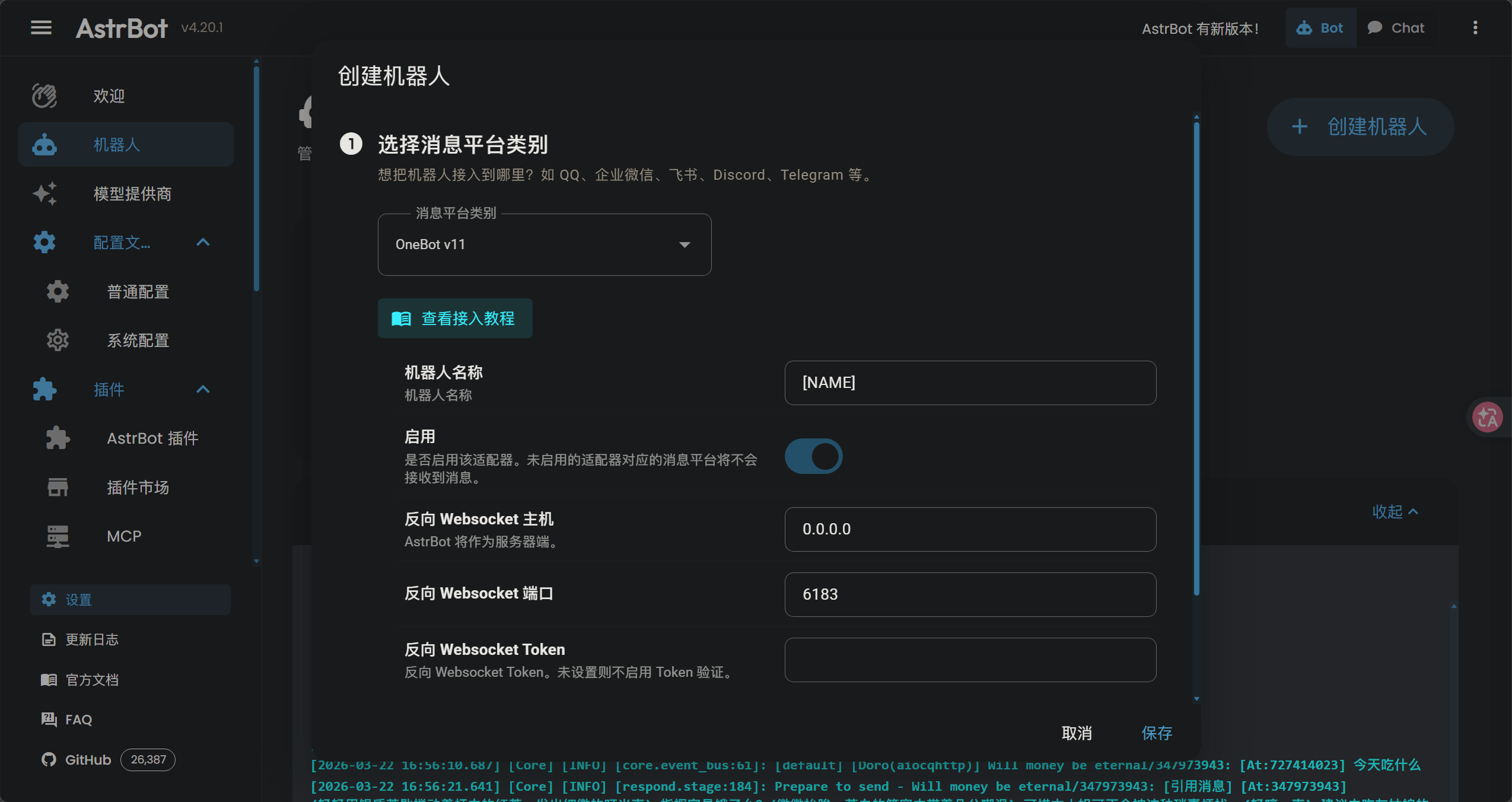
| Setting | Value | Description |
|---|---|---|
| WebSocket Type | Reverse |
NapCat connects TO AstrBot |
| Host | 0.0.0.0 |
Listen on all interfaces |
| Port | 6183 |
Default AstrBot port |
- Click Save and Restart AstrBot
5.2 Verify Connection
Check the AstrBot console for:
1 | [INFO] aiocqhttp(OneBot v11) adapter connected |
This means it starts working.
And the NapCat WebUI should show “Connected” status.
6. LLM Configuration
6.1 Adding an LLM Provider
- Open AstrBot Dashboard → Service Providers page
- Click Add Provider
- Select OpenAI (works with any OpenAI-compatible API)
- Fill in the configuration:
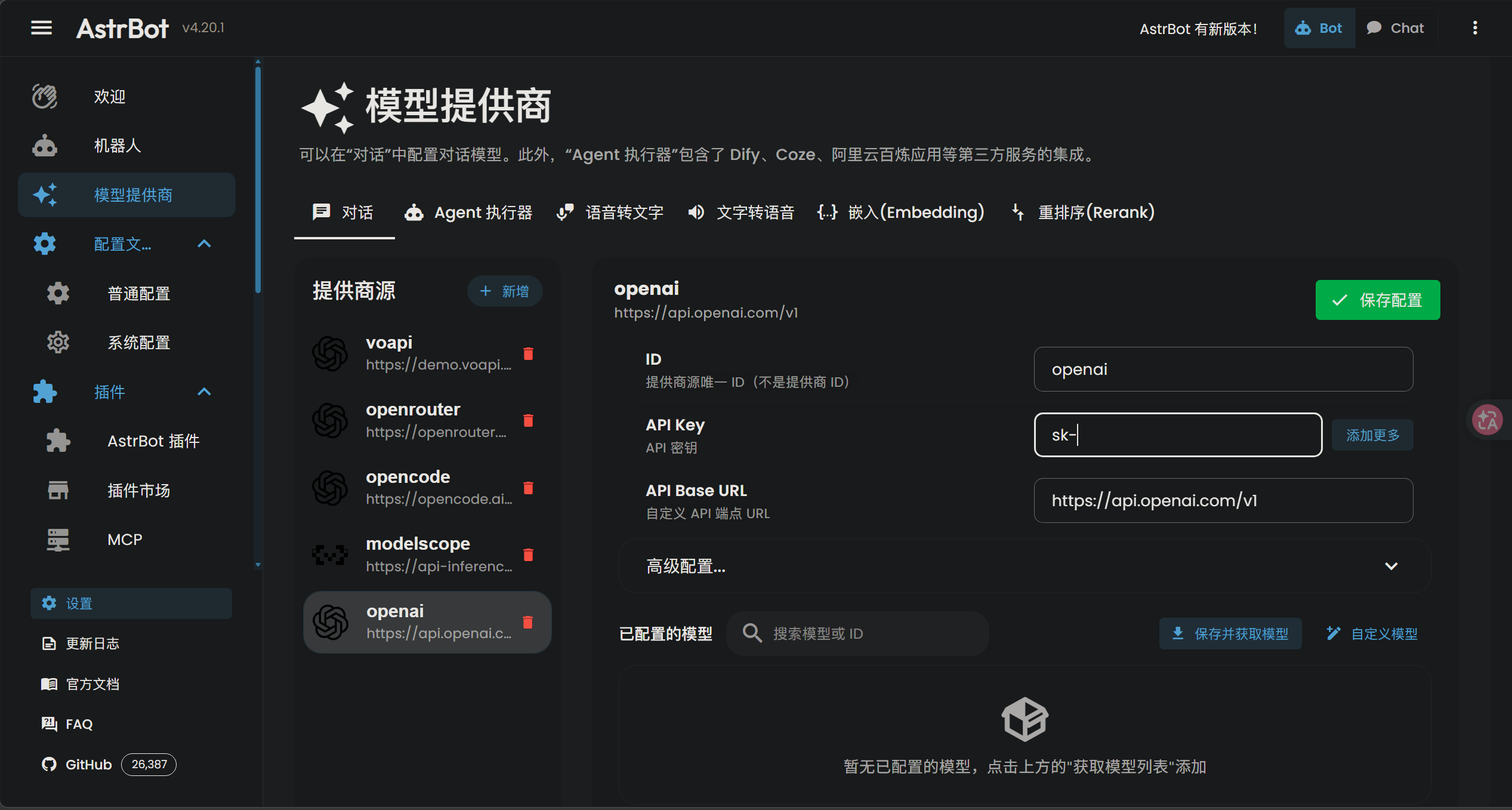
| Field | Example Value | Description |
|---|---|---|
| API Key | sk-xxxxxxxxxxxx |
Your LLM provider’s API key |
| API Base URL | https://api.deepseek.com/v1 |
Must include /v1 suffix |
| Model | deepseek-chat |
Model identifier |
- Click Save Configuration
6.2 Popular LLM Providers
| Provider | Base URL | Notes |
|---|---|---|
| OpenAI | https://api.openai.com/v1 |
Official, high quality, expensive |
| DeepSeek | https://api.deepseek.com/v1 |
Cost-effective, strong reasoning |
| OpenRouter | https://openrouter.ai/api/v1 |
Multi-provider aggregator |
| Local Ollama | http://localhost:11434/v1 |
Free, private, requires GPU |
6.3 Enable the Model
After adding a provider:
- Click Get Model List to fetch available models
- Find your target model (e.g.,
deepseek-chat) - Click the “+” button to add it
- Toggle the switch to enable it
- Go to Configuration page → select the model as your conversational model
- Click Save Configuration at the bottom-right
7. Persona Configuration
7.1 Why Persona Matters
The persona (System Prompt) defines your bot’s personality, knowledge boundaries, and response style. A well-crafted persona:
- Creates immersive roleplay experiences
- Prevents inappropriate content generation
- Maintains consistent character across conversations
7.2 Setting Up Persona
- Open AstrBot Dashboard → Persona page
- Configure the System Prompt:
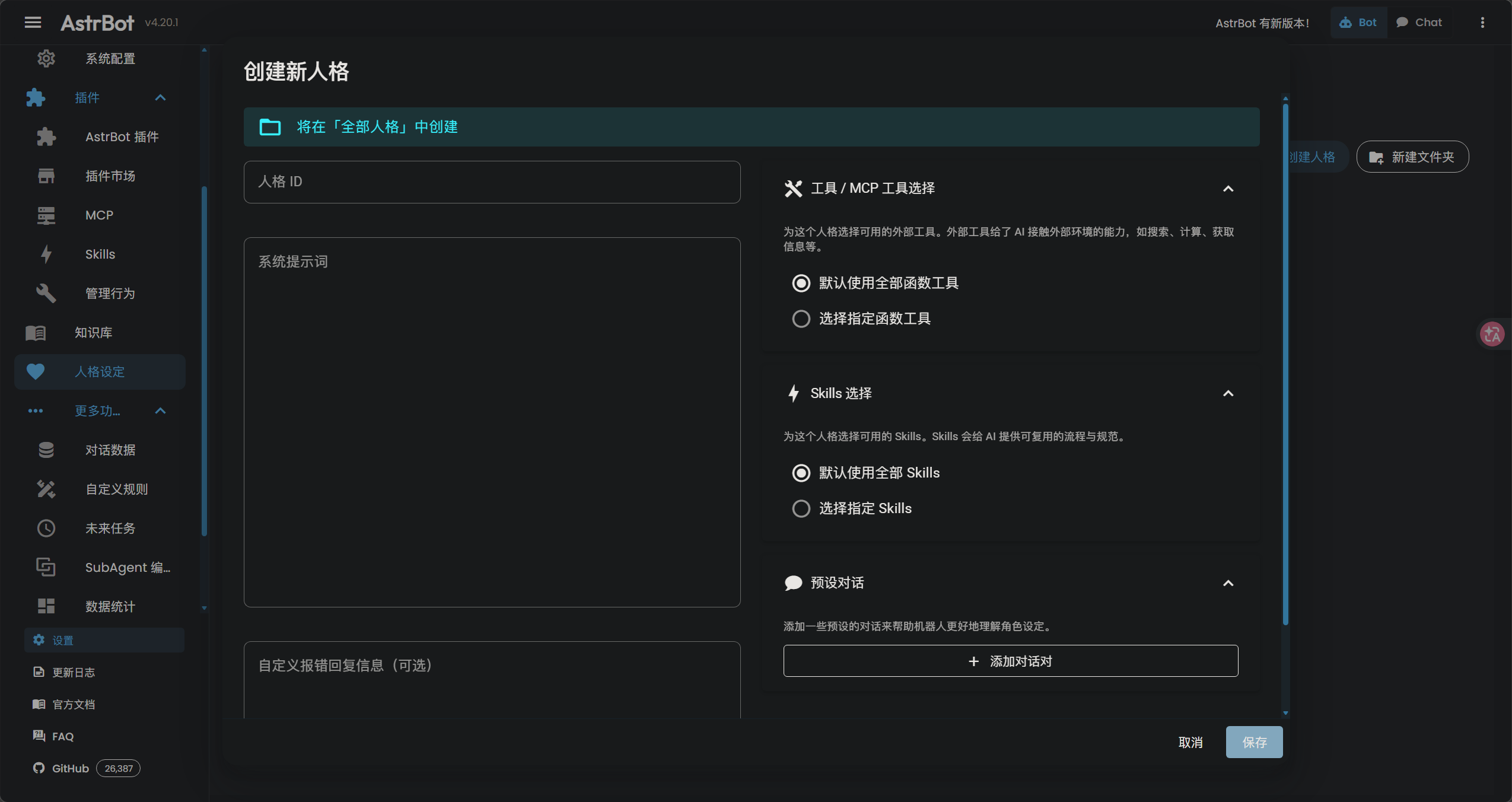
1 | You are [Character Name], a [brief description]. |
- Set Temperature to
0.8 - 0.95for creative responses - Click Save
7.3 Persona Best Practices
✅ DO:
- Use positive framing instead of negative prohibitions
- Define response format (actions, tone, length)
- Set knowledge boundaries (what the character knows)
- Include example dialogues (Few-Shot) for consistency
❌ DON’T:
- Use words like “violence”, “explicit”, “nsfw” — even in prohibitions
- Write overly long system prompts (>2000 tokens)
- Include contradictory instructions
- Forget to test with edge-case inputs
WAF Filter Alert: Some LLM providers use Web Application Firewalls (WAF) that block requests containing sensitive keywords — even in system prompts.
Bad: “Never generate violent or sexual content”
Good: “Maintain wholesome, family-friendly conversations. Politely decline inappropriate requests with a gentle rebuke.”
7.4 Custom Error Responses
Replace generic error messages with in-character responses:
1 | (sets down teacup with a gentle sigh) It seems the connection has been disrupted. How unfortunate. Please try again in a moment. |
8. Troubleshooting
8.1 Common Issues
Issue 1: QR Code Login Fails with Multi-Process Error
Symptom: Repeated QR code scans fail. Console shows:
1 | [error] [napcat] [utilityprocess] worker进程退出,退出码: 18446744073709515000 |
Cause: NapCat’s multi-process mode conflicts with the environment, causing the worker process to crash on login.
Solution: Add the environment variable to disable multi-process mode:
- Open the NapCat
.batstartup file - Add
set NAPCAT_DISABLE_MULTI_PROCESS=1right after@echo off - Save and restart NapCat
1 | @echo off |
Issue 2: 403 Forbidden — Text Not Allowed
Cause: LLM provider’s WAF blocking your request.
Solutions:
- Disable AstrBot’s built-in “Safety Mode” — its default prompt contains flagged words
- Audit your persona — remove any sensitive keywords
- Switch providers — some proxies have stricter WAF than others
Issue 3: Image Messages Cause 403 Errors
Cause: Text-only models (like DeepSeek-V3) cannot process images. AstrBot converts images to Base64, which triggers WAF as “suspicious long text”.
Solutions:
- Disable image understanding in AstrBot settings
- Route images separately — use a vision-capable model (GPT-4o-mini, Gemini Flash) only for image analysis
Issue 4: 30+ Second Delay After Config Changes
Cause: AstrBot hot-reloads configuration, which resets the WebSocket connection. NapCat’s reconnect delay causes the gap.
Solutions:
- Wait for reconnection — watch console for
adapter connectedmessage - Reduce reconnect interval in NapCat to
3000ms - Restart both services if connection doesn’t recover
Issue 5: Bot Not Responding in Groups
Cause:
- Bot needs to be @mentioned in groups.
- Your bot’s QQ account was expired.
Solutions:
- Check group settings in AstrBot Dashboard or set trigger conditions
- Restart NapcatQQ to login again
8.2 Diagnostic Checklist
Check the terminal output to get the error info
| Check | Command/Action |
|---|---|
| AstrBot running? | python main.py or check process |
| NapCat connected? | Check WebUI status |
| LLM API working? | Test via AstrBot WebUI chat |
| Logs clean? | Check AstrBot and NapCat console output |
9. Advanced: Custom Plugins
9.1 Why Write Plugins?
Plugins extend AstrBot with custom functionality without LLM token consumption. Use cases:
- Scheduled broadcasts (news, weather, reminders)
- API integrations (stock prices, game stats)
- Moderation tools (auto-delete, warnings)
- Utility commands (calculators, converters)
9.2 Plugin Structure
Create a plugin folder at AstrBot/data/plugins/your_plugin_name/:
1 | your_plugin_name/ |
manifest.json:
1 | { |
9.3 Example: Daily News Broadcast Plugin
A practical plugin that fetches daily news, free Epic games and daily bing wallpaper, and broadcasts to a QQ group at certain time — zero LLM token consumption.
Using 60s API, and by Gemini 3.1 Pro and Mimo V2 Pro
Click here to expand full plugin code (main.py)
1 | import aiohttp |
Required Dependencies:
1 | # Activate virtual environment first |
After installing dependencies, restart AstrBot (python main.py).
10. Summary
| Component | Purpose | Key Setting |
|---|---|---|
| NapCatQQ | QQ protocol bridge | Reverse WebSocket → ws://127.0.0.1:6183/ws |
| AstrBot | LLM orchestrator | Platform: QQ (OneBot V11) |
| LLM Provider | AI brain | API Key + Base URL + Model |
| Persona | Bot personality | System prompt with positive framing |
Architecture Flow:
1 | User sends QQ message |